
Course Progress
50%
Course Progress
Why Restarting Your Computer Regularly Matters
Welcome to Day 31! Today, we'll focus on a simple yet powerful action that can keep your computer running smoothly—restarting. Many people leave their computers on for days or weeks without restarting, but doing so regularly has important benefits.
Clears Memory: When your computer runs for a long time without restarting, its memory (RAM) can get cluttered. Restarting clears this memory, which can speed up performance.
Fixes Minor Issues: Many minor issues, like freezing programs or slow performance, can be resolved with a restart. It's like giving your computer a fresh start.
Installs Updates: Some software updates require a restart to complete the installation process. By restarting regularly, you ensure your system is fully up-to-date.
On Windows: Click the Start button, then select Power → Restart.
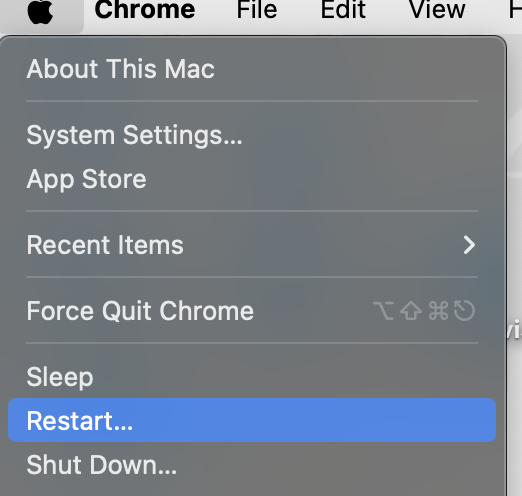
On Mac: Click the Apple icon in the top-left corner, then choose Restart.
Restarting is an easy way to resolve performance issues and ensure your computer stays in good health. It's a good habit to restart your computer at least once a week.
If your computer has been running for a while, restart it today. Pay attention to how it runs afterward—it may feel faster and more responsive.
If you're using your computer for a lot of different tasks, restarting it more frequently can help keep things running smoothly. Some people even restart their computer daily for optimal performance.
