
Course Progress
50%
Course Progress
Keep Your Files Neat: How to Organize and Sort Them
It's Day 33, and today we'll focus on how to organize and sort files on your computer. A well-organized file system makes it easy to find what you need, keep your workspace clutter-free, and improve your overall productivity.
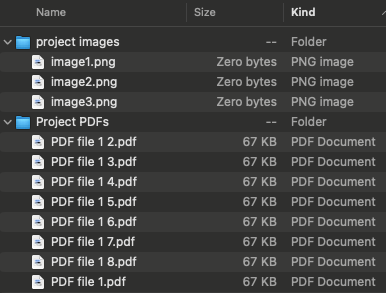
Create folders: Group related files together by creating folders. For example, you can create folders for Work, Photos, or Personal Documents.
Use subfolders: Inside your main folders, create subfolders to further organize your files. For example, within your Work folder, you might have subfolders for 2024 Projects and 2023 Projects.
Name files clearly: Use descriptive names for your files so you can easily identify them later (e.g., "Invoice_January_2024").
In File Explorer (Windows) or Finder (Mac), you can sort files by:
Name: Alphabetically by file name.
Date modified: The most recently edited files will appear first.
Size: Sort by file size to identify large files that may be taking up space.
Keeping your files organized and sorted helps you find documents quickly and ensures your computer's storage is efficiently used. It also reduces stress when you know exactly where everything is.
Take some time today to organize your files. Create folders for different categories, move files into the appropriate folders, and experiment with sorting options in your file manager.
If you work with a lot of documents, consider adding dates to your file names (e.g., "Report_Jan2024") so you can easily find them in the future.
