
Course Progress
50%
Course Progress
Save Space: How to Compress Files on Your Computer
It's Day 35, and today we'll learn about file compression—a useful way to reduce the size of large files, making them easier to store and share.
File compression reduces the size of a file or a group of files, making them take up less space on your computer. Compressed files are often saved in a .zip or .rar format.
On Windows: Right-click on the file or folder you want to compress, select Send to, then choose Compressed (zipped) folder. This will create a .zip file.
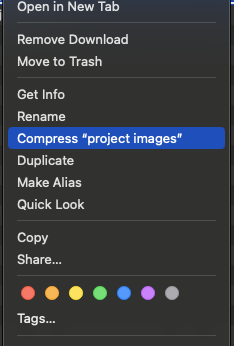
On Mac: Right-click on the file or folder, and choose Compress. A .zip file will appear in the same location as the original.
You can compress multiple files into one .zip folder, making it easier to send or store them.
Compressing files saves space on your hard drive and makes it easier to share large files via email or cloud services. It's also useful for archiving old documents that you don't need to access often.
Choose a few large files or a folder with multiple files, and practice compressing them into a .zip folder. Check the size of the original files compared to the compressed version to see how much space you saved.
When emailing large attachments, compress them into a .zip file to ensure they're easier to send and download.
